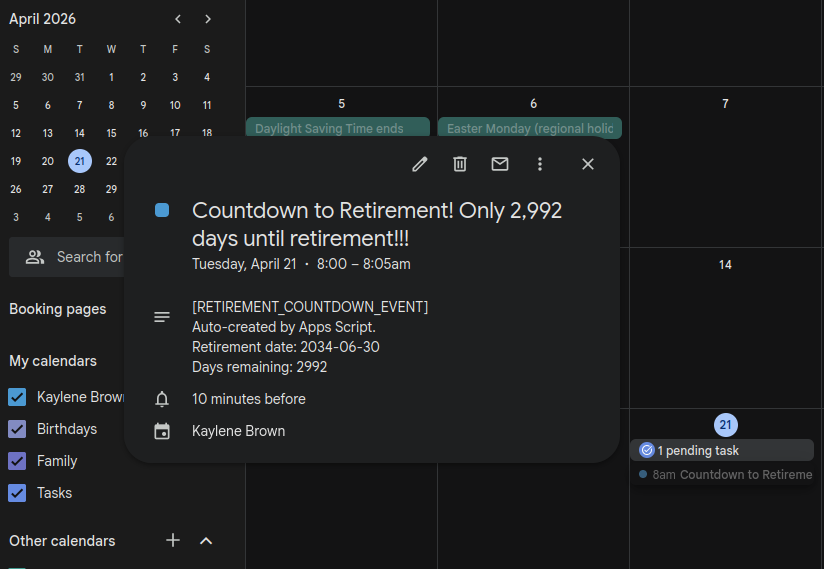
I am a big fan of small automations that quietly improve your day. This week I wrote a tiny Google Apps Script that creates (or updates) a calendar event every morning showing exactly how many days are left until my retirement date.
It is simple, slightly ridiculous, and weirdly motivating. It turns a distant goal into a daily nudge, without me having to think about it.
What it does
- Runs daily and checks today’s date.
- Calculates how many days remain until my retirement date.
- Creates a short 5-minute event at 8:00 AM titled with the countdown.
- If the event already exists for today, it updates it instead of creating duplicates.
- Stops automatically once retirement day has passed.
Why I built it
I like tracking progress and I love the simplicity that automation can bring to my life. A calendar is already the one place I look every day, so putting the countdown there makes it feel effortless. Also: future me deserves a little hype.
How the script avoids duplicates
The key is a tag in the event description:
[RETIREMENT_COUNTDOWN_EVENT]
Each time the script runs, it looks for events between 7:30 AM and 8:30 AM. If it finds an event with that tag, it updates the title/time/description. If not, it creates a new event.
The script
Here is the version I am currently using:
const CALENDAR_ID = 'primary'; // use 'primary' for your main calendar
const RETIREMENT_DATE = new Date('2034-06-30T00:00:00'); // Use UTC time
const EVENT_DURATION_MINUTES = 5;

function createTodayRetirementCountdownEvent() {
  try {
    const cal = CalendarApp.getCalendarById(CALENDAR_ID);
    if (!cal) throw new Error('Could not find calendar with ID ' + CALENDAR_ID)

    const now = new Date();
    const today = new Date(now.getFullYear(), now.getMonth(), now.getDate());
    const retirement = new Date(
      RETIREMENT_DATE.getFullYear(),
      RETIREMENT_DATE.getMonth(),
      RETIREMENT_DATE.getDate()
    );

    // Stop automatically after retirement day
    if (today > retirement) {
      Logger.log('Retirement date has already passed.');
      return;
    }

    const msPerDay = 1000 * 60 * 60 * 24;
    const daysLeft = Math.ceil((retirement - today) / msPerDay);

    const title =
      daysLeft === 0
        ? 'Retirement Day!!!'
        : `Countdown to Retirement! Only ${daysLeft.toLocaleString()} days until retirement!!!`;

    const start = new Date(today);
    start.setHours(8, 0, 0, 0);

    const end = new Date(start.getTime() + EVENT_DURATION_MINUTES * 60 * 1000);

    const tag = '[RETIREMENT_COUNTDOWN_EVENT]';

    // Look for an existing event today in a small window around 8am
    const windowStart = new Date(today);
    windowStart.setHours(7, 30, 0, 0);

    const windowEnd = new Date(today);
    windowEnd.setHours(8, 30, 0, 0);

    const events = cal.getEvents(windowStart, windowEnd);
    let existing = null;

    for (const event of events) {
      const desc = event.getDescription() || '';
      if (desc.includes(tag)) {
        existing = event;
        break;
      }
    }

    const description =
      `${tag}\n` +
      `Auto-created by Apps Script.\n` +
      `Retirement date: 2034-06-30\n` +
      `Days remaining: ${daysLeft}`;

    if (existing) {
      existing.setTitle(title);
      existing.setTime(start, end);
      existing.setDescription(description);
    } else {
      cal.createEvent(title, start, end, {
        description: description
      });
    }

  } catch (error) {
    Logger.log('Error creating or updating event: ' + error.message);
  }
}
Make it run automatically
To make this hands-off, add a time-based trigger in Apps Script:
- Open the Apps Script editor.
- Go to Triggers (clock icon).
- Click Add Trigger.
- Choose
createTodayRetirementCountdownEvent. - Select Time-driven and set it to run daily what ever time suits you. I love a good morning reminder.